Setting up ntfy
Alerts reach your phone through the free app ntfy. Setup takes about five minutes. Steps 3 and 4 matter most: without them the alert will not ring when your phone is muted.
1Install the app
Android: ntfy from the Play Store or F-Droid. iPhone: ntfy from the App Store.
Play Store · F-Droid · App Store
On first launch, allow the app to send notifications.
2Subscribe to a topic
In ntfy, tap the plus and enter a topic name. Enter the same name in Dip-Alarm under Settings, in the “ntfy topic” field. Upper and lower case must match.
Choose a long, random name such as dip-8f3k2m9x. Anyone who knows or guesses the name can read your alerts. Names like your first name or “dipalarm” are easy to guess.
3Settings in the subscription
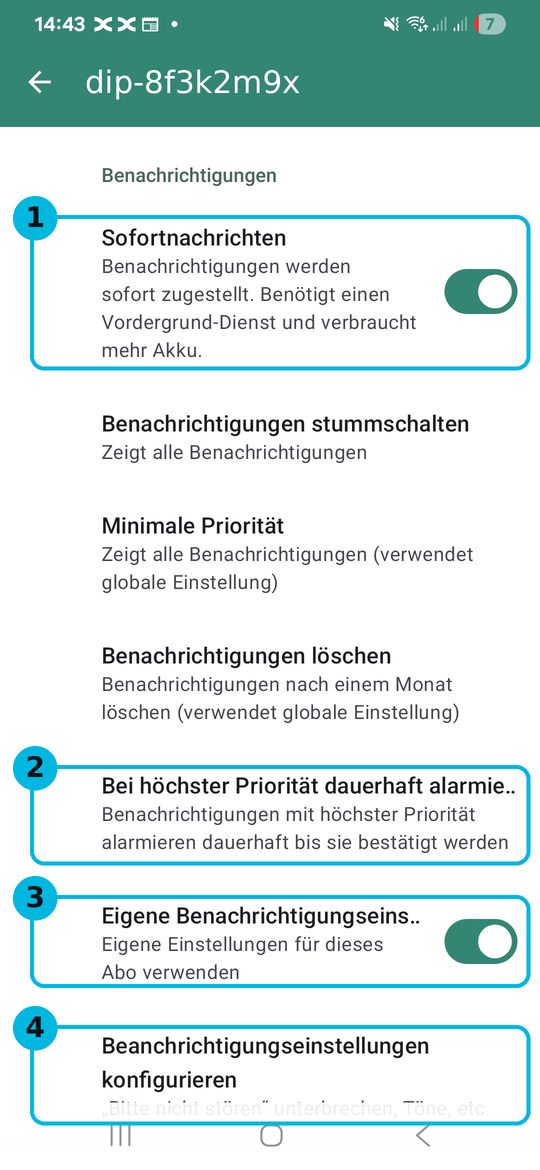
In ntfy, open your topic, tap the three dots at the top right and then the subscription settings. Set the four marked items like this:
- 1Instant delivery: on. Otherwise the alert can arrive minutes late.
- 2Keep alerting at the highest priority: on. A crash then keeps ringing until you acknowledge it.
- 3Custom notification settings: on. This gives the topic its own sounds and rules.
- 4Configure notification settings: this opens the Android page for this topic. There, open the category with the highest priority, allow it to override “Do not disturb”, and pick a sound that wakes you up.
The screenshots were taken on a Samsung phone set to German. On other devices and in other languages the items are named slightly differently but sit in the same place.
4Android: allow the app's notifications
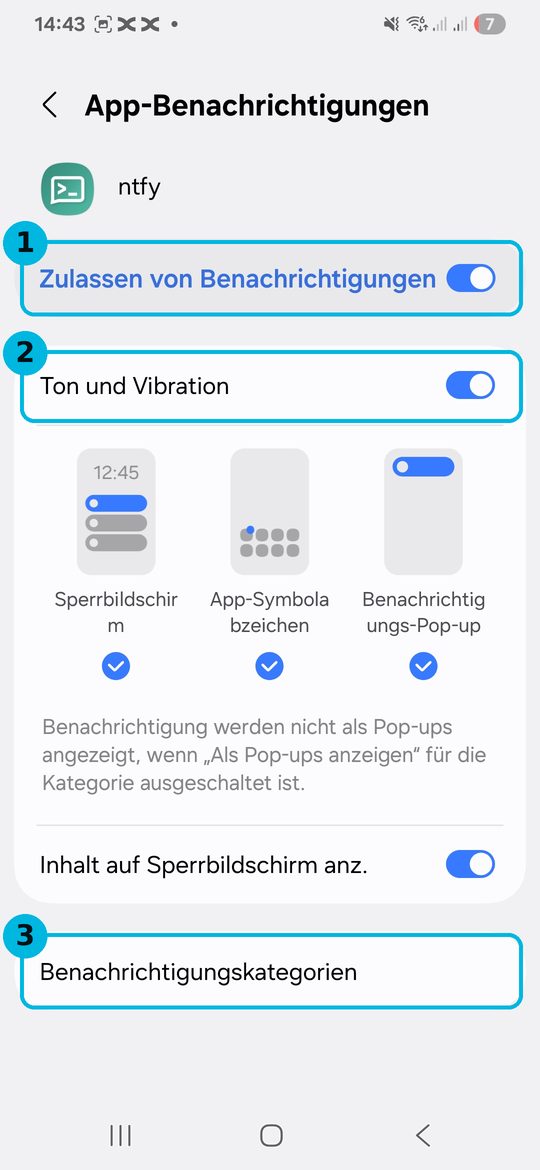
In the Android settings, open Apps, then ntfy, then Notifications. Check the three marked items:
- 1Allow notifications: on.
- 2Sound and vibration: on.
- 3Notification categories: this is where you find your topic's categories if you want to change the sound or “Do not disturb” later.
Also exclude ntfy from battery saving: Apps, ntfy, Battery, “Unrestricted”. Otherwise Android stops the app in the background and no alert arrives.
5Test it
Mute your phone and switch on “Do not disturb”. Then press “Save and send test alert” in the Dip-Alarm settings. The alert must still ring loudly.
Repeat the test after an update of the phone or the app. Updates sometimes reset these settings.
iPhone
The iPhone does not have the settings from steps 3 and 4. Subscribe to the topic and allow notifications. The mute switch and an active Focus can suppress the sound, so add ntfy to “Allowed apps” in your Focus. An alert that reliably breaks through silent mode is currently not possible on the iPhone.
If nothing arrives
- Compare the topic name in ntfy and in Dip-Alarm, character by character.
- The server must be the same in both places, normally https://ntfy.sh.
- If the test alert arrives but without sound: check step 3, item 4 and step 4 again.
- If it arrives late: switch on instant delivery and exclude ntfy from battery saving.
- During your quiet hours an alert arrives without sound on purpose. The test alert always rings.